devogram

Blog about Telegram bots

In this article, you will learn different ways to set up a webhook for a Telegram bot in the context of the aiogram framework. However, the information here will be useful for more than just that. You can use it as a cheat sheet

Article Contents

  1. What is a webhook
  2. Where to start
  3. Getting a domain
  4. Installing a web server
  5. Certificate from Lets Encrypt
  6. Self-signed certificate
  7. Connecting to the webhook

What is a webhook

🪝 Webhook – is a mechanism for processing updates by receiving POST requests to a web server and passing them to the bot

With polling, we get updates from the api.telegram.org endpoint, but with a webhook, we provide Telegram with our personal link where it will send updates, and we will catch them

When it's useful

  • In a situation where the bot has a very high load, meaning many updates per unit of time. It is known that polling (the getUpdates method) allows you to get a maximum of 100 updates per call
  • If we don't want to see failed attempts to get updates in the logs. With polling, every bot constantly makes requests to api.telegram.org, even if there are no updates or if Telegram has server issues. It's important to remember that each getUpdates call has an execution time and a certain load
  • This mechanism allows you to distribute updates to your desired entry points and implement horizontal scaling of the project
  • If you have many bots on one server or want to create a multibot (a bot that manages many bots). With webhooks, this will be easier and of higher quality

Prerequisites

  • Server — Telegram will send updates to a specified URL, which you need to have access to. Therefore, you need to get your own server, for example, a VPS. You can read about organizing this online
  • Port — The officially supported ports are 443, 80, 88, and 8443. Other ports are not supported. Don't forget to configure your firewall so the server accepts requests
  • HTTPS — Telegram will not send updates over an insecure connection (HTTP). The server must have an SSL/TLS certificate (the latter being the successor to the former) to support requests from Telegram. A self-signed certificate is also allowed
  • SSL/TLS Version — Currently, TLS 1.2 and higher are supported. Older versions contain vulnerabilities and will not work
  • IPv4 — IPv6 is not currently supported

Additional security If there is a server that accepts requests, it can be exploited. For example, someone might send their own POST request, the bot will think it's an update, and something bad will happen. To prevent this, some check the sender's IP address (for Telegram, they are static — 149.154.160.0/20 and 91.108.4.0/22), while others add their own keys/secrets to Telegram's requests (this is done when setting up the webhook), which are then verified on the server, but the choice is yours


Where to start

  • Certificate type — official (approved by a Certificate authority) or self-signed. Currently, official certificates are usually paid, while self-signed ones are always free (because you make them yourself). But, for example, there is a service Let's Encrypt that issues official certificates for free if you already have a domain
  • Bot server — for a webhook, the bot itself must run as a server and listen on a specific port. You can set up the server using aiohttp, FastAPI, Flask, and others
  • General web server — if the bot server supports WSGI/ASGI, then requests can be handled directly by listening on the appropriate port. But usually, to avoid occupying commonly used ports like 443, general web servers like nginx or Apache (there are others as well) are installed on the server, acting as a reverse proxy and forwarding requests to the required web application (for example, two different domains are two different applications)

This article covers the following options


Getting a domain

The easiest way is to buy a domain you like from a domain name registrar (for example, Namecheap, Cloudflare, GoDaddy, Porkbun). But some people don't want to pay for domain rental, for example, if it's something non-commercial. In that case, there are services that allow you to get completely free domains (but this approach has its drawbacks)

If you already have a domain, all that's left is to create a DNS record that points to your server. Just create a record of type A and add your server's IP address to it. That's it, the domain is ready, but you might have to wait a little while for the domain to propagate across the internet

Free domain

I'll show you how to get a free domain using the FreeDNS service. You won't be able to choose an arbitrary name for it (formally, it will be a subdomain)

  • Register on the website https://freedns.afraid.org
  • Go to the subdomains section and click «Add a subdomain»
  • Make sure that the «Type» field says A
  • In the «Domain» field, choose your desired domain (if you click «Many many more available» -> «Share Domain Registry», more options will appear)
  • In the «Subdomain» field, enter the name of the subdomain (your custom name), it will look like subdomain.domain
  • In the «Destination» field, enter the IP address of your server
  • Confirm the creation of the subdomain

You are not the owner of a free domain In such services, people let others use their domains. There are no guarantees of stability (you can only look at their uptime). Also, it's better to choose less popular domains to avoid problems with certificate renewal (Let's Encrypt has limits on the frequency of renewals). Remember, this option is not suitable for serious projects


Installing a web server

An example of installing nginx for Debian Linux

  • Official instructions — https://nginx.org/en/linux_packages.html#Debian
  • Check if it's installed sudo nginx -v
  • Add to autostart sudo systemctl enable nginx
  • Check the service status sudo systemctl status nginx
  • If not running sudo systemctl start nginx

Certificate from Lets Encrypt

Log in to your server via SSH and install certbot. The official website has an instruction generator for proper installation, all you need is to choose the required system and software

In our case, the command will be

sudo certbot certonly --nginx -d <your-domain>

You will have to wait a few seconds. After obtaining the certificate, certbot will set a timer for its auto-renewal

Congratulations, you now have an official certificate! The certificate files (fullchain.pem — the certificate chain, privkey.pem — the private key) will be located at the following paths. You don't need to move or copy them anywhere

  • /etc/letsencrypt/live/<your-domain>/fullchain.pem
  • /etc/letsencrypt/live/<your-domain>/privkey.pem

Self-signed certificate

The disadvantages of a self-signed certificate are that you are responsible for its renewal and you will have to send it to Telegram, but more on that later. On the bright side — you can specify an arbitrary lifetime (with Let's Encrypt it's strictly 90 days)

Log in to your server via SSH and generate the certificate. For example, this is how its creation might look with the OpenSSL utility

openssl req -x509 -nodes -days 365 -newkey rsa:4096 -keyout ./cert.key -outform PEM -out ./cert.pem
  • req – subcommand for certificates
  • x509 – one of the standards for certificates
  • days 365 – certificate lifetime
  • newkey rsa:4096 – create a key with the RSA algorithm of length 4096 bits
  • outform PEM – the required PEM generation format
  • keyout and out – where to place the key and the certificate

During generation, be sure to enter the server's IP address in the Common Name field!

Done, you now have a self-signed certificate!


Connecting to the webhook

You have the certificate, all that's left is to connect the bot to the webhook

Nginx configuration

First, you need to change the nginx configuration so it knows about our certificate and uses HTTPS. A simple example

server {
    listen 443 ssl;
    server_name <your-domain or server-ip>;

    ssl_certificate /path/to/certificate;
    ssl_certificate_key /path/to/privatekey;

    location / {
        proxy_pass http://127.0.0.1:<bot-server-port>;

        proxy_set_header Host $host;
        proxy_set_header X-Real-IP $remote_addr;
        proxy_set_header X-Forwarded-For $proxy_add_x_forwarded_for;
        proxy_set_header X-Forwarded-Proto $scheme;
    }
}

bot-server-port – come up with a port on which the bot server will listen. It can be any number from 1024 to 65535. Later, you will also need to specify it when starting the bot

To apply the changes, execute sudo nginx -s reload

Setting the webhook

This is done via the setWebhook method. Here are various examples

If the certificate is official

await bot.set_webhook(
    getenv('WEBHOOK_URL'),
    secret_token=getenv('WEBHOOK_SECRET'),
    allowed_updates=list(ALLOWED_UPDATES),
)

If the certificate is self-signed, you must specify the certificate parameter with the path to the certificate. Make sure the cert.pem file has the correct permissions

await bot.set_webhook(
    getenv('WEBHOOK_URL'),
    certificate=FSInputFile('/path/to/cert.pem'),
    secret_token=getenv('WEBHOOK_SECRET'),
    allowed_updates=list(ALLOWED_UPDATES),
)

or manually via the console

curl -F "url=https://serverip-or-domain/webhook_path" -F "secret_token=<SECRET>" -F "certificate=@cert.pem" https://api.telegram.org/bot<TOKEN>/setWebhook

In the last option, you need to be in the directory with the file and be sure to add @, meaning the certificate name here is cert.pem

  • WEBHOOK_URL — a required parameter for the URL (https://...)
  • secret_token — an optional parameter that I mentioned for additional security
  • allowed_updates — an optional parameter, specifying which updates can be sent to the bot

Configuring the bot server

I recommend choosing aiohttp because it's more compact and aiogram has an integration with it

Example for aiohttp

from aiogram.webhook.aiohttp_server import (
    SimpleRequestHandler,
    setup_application,
)

app = web.Application()
SimpleRequestHandler(
    dispatcher=dp, bot=bot,
).register(
    app, path=WEBHOOK_PATH,
)
setup_application(app, dp, bot=bot)
web.run_app(
    app, 
    host=WEB_SERVER_HOST, 
    port=WEB_SERVER_PORT,
)
  • web and app – a module for interacting with the HTTP protocol and an application instance of aiohttp, respectively
  • SimpleRequestHandler – a special aiogram filter that catches only POST requests and redirects them to the bot for processing
  • setup_application – a function that helps configure the startup-shutdown processes of the aiohttp application along with the bot

Example for FastAPI

from aiogram import Dispatcher, Bot
from aiogram.types import Update
from fastapi import APIRouter, Depends, Header, HTTPException
from pydantic import SecretStr
from starlette import status

class BotStub:
    pass

class DispatcherStub:
    pass

class SecretStub:
    pass

webhook_router = APIRouter(prefix="/webhook", tags=["Telegram Webhook"])


@webhook_router.post("")
async def webhook_route(
    update: Update,
    secret: SecretStr = Header(alias="X-Telegram-Bot-Api-Secret-Token"),
    expected_secret: str = Depends(SecretStub),
    bot: Bot = Depends(BotStub),
    dispatcher: Dispatcher = Depends(DispatcherStub),
):
    if secret.get_secret_value() != expected_secret:
        raise HTTPException(
            detail="Invalid secret",
            status_code=status.HTTP_401_UNAUTHORIZED,
        )
    await dispatcher.feed_update(bot, update=update)
    return {"ok": True}

def create_app(bot: Bot, dispatcher: Dispatcher, webhook_secret: str) -> FastAPI:
    app = FastAPI()

    app.dependency_overrides.update(
        {
            BotStub: lambda: bot,
            DispatcherStub: lambda: dispatcher,
            SecretStub: lambda: webhook_secret,
        }
    )
    app.include_router(webhook_router)
    return app

The key idea is to receive a request, process it according to our requirements, and pass it to the bot via the dispatcher's feed methods

Useful commands

  • Check locally if the certificate works openssl s_client -connect ip_address:443
  • View requests to nginx tail -f /var/log/nginx/access.log
  • View webhook status (conveniently right in your browser) https://api.telegram.org/bot<TOKEN>/getWebhookInfo

Found a mistake? Feedback: hello@shaonis.space
This article describes the key aspects of how Telegram bots work and will be useful for both beginners who are just starting out and for advanced developers. Specifically, we're talking about the aiogram framework, but all the ideas presented can be seen anywhere. I assure you that after reading this, it will be much easier for you to understand all the details of the mechanism as a single process

Article Contents

  1. The concept of an update in Telegram
  2. Methods of receiving updates
  3. Processing of updates
  4. Router and dispatcher
  5. Middleware
  6. Filter
  7. Handler

Local terms All terms should be understood in the context of Telegram and aiogram. Similar concepts can be found in many places, so don't take them as universal definitions for everything!


Update

💡 An Update — is an object with data that appears as a result of a certain action from the client's side, for example, a user or a bot

Examples for better understanding

  • A user writes a message to the bot — an update is created with all the data by which we understand where, when, and how the message was sent, so it can be processed
  • A user joins/leaves a channel or group — a corresponding update appears. Which chat it was, the user's updated status in the chat...
  • An admin bans someone — we see an update with data about this event: in which chat, whom, for how long, and so on
  • A user presses a button — we receive an update with data about the button

Why don't bots see each other's messages? A trivial but simple example. Imagine there are two bots in a group. The first one sends the message «chicken», the second one replies «egg». It seems normal, but what if you configure the first bot to reply to «egg» with «chicken» again? Then you get an infinite loop of messages chicken, egg, chicken, egg... This is why Telegram has such a restriction

The term update should be used as a general concept that speaks about some events and their processing. A good sentence would be: «My bot doesn't catch updates» – this literally means that the bot does not react to the user's actions in any way

Types of updates

An update should be understood as some event. In turn, each event that has occurred has a defined update type. This is done so that one can easily understand the type of event (new message, user deletion, button click, etc) and standardize the data that will be included in the update. Because it is better to have a certain type of update with predefined fields that can be in it, rather than receiving a universal update and trying to figure out what happened

The most commonly used update types

  • Message – contains data about a message in a chat: text/media, formatting, sender data, possibly a keyboard, and much more
  • CallbackQuery – is responsible for inline buttons, it contains data that was put into the buttons during their creation, user data, chat data, and more
  • InlineQuery – comes in inline mode (eg bots like @gif receive them), contains the user's query, chat type, and other data for managing the output results
  • ChatMemberUpdated – stores data about updates of users/bots in a chat, joining/leaving the chat, changing permissions, and so on
  • ChatJoinRequest – represents a request to join a chat with the corresponding data

Methods of receiving updates

You can manage a bot without running it It is often said «send from under the token» – that is, take the bot's token and send the necessary request to the Telegram Bot API. To do this, you don't need to run the update receiving mechanism, but its operation will not interfere in any way

  • 🔄 Polling — a polling mechanism and the simplest way to get updates. The client (that is, our bot on the server) constantly, at small intervals, sends requests to api.telegram.org to get new updates. This mechanism is very easy to try manually, you can send the corresponding request directly in your browser and see the response from Telegram (https://api.telegram.org/botTOKEN/getUpdates, where TOKEN is your bot's token)
  • ⏳ Long-polling — a cooler version of polling. The bot again sends requests to api.telegram.org, but not constantly. If there are no new updates, Telegram maintains a connection with the bot's server until new updates appear. When updates appear, Telegram sends the updates to the bot over the previously opened connection. This is some kind of hybrid of polling + an idea from webhook
  • 🌐 Webhook — a method of receiving updates in which we do not need to poll the API at all. The key point is to inform Telegram where we want it to send us updates. Thus, our bot just waits for new events. However, this method of receiving updates requires additional configuration

Which update receiving mechanism should be chosen? Long-polling or Webhook — that is the question. To answer it, one should analyze the load on the bot, the need for its scaling. If in the future the bot will be popular only locally, then polling will be enough. A webhook will make sense, for example, for organizing a high-load platform or for a quality multibot. But the method of receiving updates can always be changed!


Processing of updates

The full path of update processing includes the following stages

  • The server with the bot receives an update
  • The bot eats the update (feed methods, which pass the update directly to the bot)

Then the update goes through the so-called chain of processors

  • Passing through outer middlewares
  • The update running through the hierarchy of routers
  • Filters for the update (custom and built-in)
  • It gets into inner middlewares
  • Event processing in a handler
  • Post-processing

Knowledge vs. trial and error Not every person who uses aiogram understands how an update passes through all these objects. It is important to be able to see the big picture. Then you will be able to quickly understand where and how to implement this or that bot logic!


Router and dispatcher

We received an update, what's next? Obviously, the bot should respond to some things and not to others — that is, filter the events that are relevant to it. Here, registrations and processors come into play — they are the foundation of the entire filtering system

  • 📌 Registration can be understood as setting a processor for the specified update type in a certain order (priority) relative to other processors
  • 🌀 Processors can be handlers, filters, and middlewares that somehow interact with the update (more on each of them a little later). The point is that when aiogram receives an update, it will try to «catch it with processors», and in the order of their registration. First, the framework will try to give the update to those processors that were registered earlier, and only then (if it did not fit any of them) to others

Registrations are important One of the most common mistakes among beginners is precisely the misunderstanding of the nature of registrations. Keep this in mind — and you will have fewer thoughts about why this update first goes there and not here

Now let's move on to the organization of catching updates, namely to routers. Perhaps you have only used aiogram 2.X and routers scare you, it's not clear why they are needed. Then I will try to change your mind!

  • 📡 Router — is an object that represents a branch of registered processors, it can also have a name
  • 🎩 Dispatcher — the root (main) router that contains all the nested routers of the bot, stores the storage and FSM strategy, and is responsible for starting the bot (or feeding it updates). You can also register processors with it

Purely theoretically, one dispatcher as a router would be enough to handle all events. But using routers has its advantages

  1. Modularity:

    • Each router is responsible for a specific functionality of the bot
    • This improves code organization and makes it more structured
    • Examples:
      • The admin router contains handlers only for administrators
      • The user router processes commands from regular users
      • The payment router is responsible for all payment-related operations
    • This approach simplifies code navigation and maintenance
  2. Registration:

    • Instead of registering each processor in the dispatcher, you can manage entire branches of processors
    • This makes it easier to set the priority of update processing
    • Example:
      • First, updates from the user router are processed
      • Then, if the update is not processed, it goes to the admin router
    • Important: the order of registration of processors within each router also matters
  3. Flexibility:

    • You can easily enable or disable entire groups of functionality
    • This is useful for:
      • Testing new features without affecting the main code
      • Implementing «red buttons» to quickly disable certain functions
      • Creating multibots where different sets of functions can be enabled depending on the context
    • Example: you can temporarily disable the payment router for maintenance without affecting other bot functions
  4. Privacy:

    • Each router can have its own filters and middlewares
    • This allows:
      • Setting access rights checks once for the entire set of handlers
      • Logging actions within a specific functionality
    • Examples:
      • The admin router can have a filter that checks for administrative rights for all its handlers
      • The payment router can log all financial transactions without affecting other parts of the bot
  5. Hierarchy:

    • Routers can contain other routers, creating a tree-like structure
    • This allows:
      • Implementing complex update processing systems
      • Creating flexible access rights systems
    • Example:
      • The main user router can contain sub-routers beginner, advanced, premium
      • Each sub-router has its own set of commands and functions available for the corresponding user level

None of these advantages exist with a single dispatcher But don't think badly of the dispatcher. It serves more general purposes. The text above is aimed at convincing you not to use only one dispatcher in your bot (unless, of course, it's a primitive functionality). P.S. Switch to aiogram 3.X

How an update propagates through routers, their filters, and handlers (middlewares are not shown)


Middleware

🔐 A Middleware — is an object that acts as an intermediary link between processors and works with an update at the level of its type [1]. It has two types of registration [2]. Its use comes down to calling or not calling the next processor in the chain in the right place (according to the bot's logic) [3]. Middleware provides the opportunity for pre, «inner», post, and outgoing processing of updates [4]. They can be implemented as classes or functions (the first option is more common)

[1] Middleware registration is only possible at the update type level, so the content of the internal data of the update does not play any role for it (but no one said that during processing, middleware cannot act as a filter for specific data in the update)

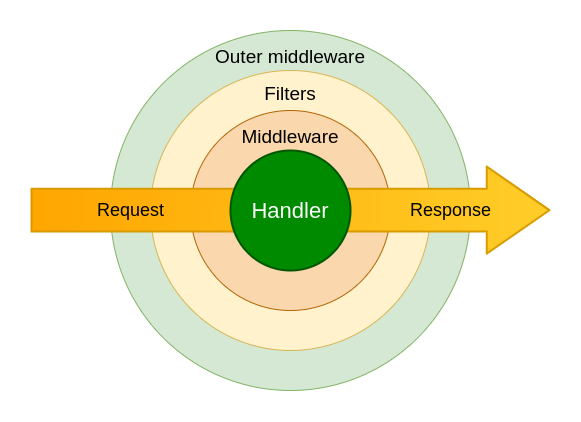
[2] Let's deal with the two types of registrations, for this, let's look at the figure below (original)

Organization of middleware

As you can see, there are outer middleware and middleware, in simple terms — outer and inner. It would be correct to think that they have different registration priorities for an update

What is the difference between these registrations?

  • If there are 2 middlewares, one registered as outer, and the other as inner (for the same type), then a newly-arrived update will first meet the outer one, and only then the inner one
  • The outer middleware will be called for every update with the registered type, which cannot be said for inner registration
  • In the outer middleware, when processing an update, it is not known which handler it will potentially go to, that is, everything is at the update type level. But a middleware registered internally will have access to the update only after it has passed through all the previous processors, including filters. This will mean that the bot must have some specific handlers to react to this update

Registration for any update A middleware can be registered in such a way that any updates (of the update type) will come to it. The type of registration does not affect this in any way. Formally, outer and inner registration for the update type are different things, but in fact, they will work the same. P.S. It's better to use outer for this

[3] About calling the next processor in the chain. For example, let's look at this middleware code (original)

from aiogram import BaseMiddleware
from aiogram.types import Message


class CounterMiddleware(BaseMiddleware):
    def __init__(self) -> None:
        self.counter = 0

    async def __call__(
        self,
        handler: Callable[[Message, Dict[str, Any]], Awaitable[Any]],
        event: Message,
        data: Dict[str, Any]
    ) -> Any:
        self.counter += 1
        data['counter'] = self.counter
        return await handler(event, data)

Special attention should be paid to the await handler(event, data) call. This action passes the update further down the chain of processors. If there is a case in the middleware (for example, under certain conditions) where await handler(event, data) is not called, it will mean that the update is discarded/dropped. That is, none of the processors below will get access to the update as if it never existed. Therefore, we can say that in general, the job of a middleware is to pass data from the update somewhere and/or drop it under certain filtering conditions

[4] About the types of processing

  • Pre-processing (outer registration) is useful in cases where a minimum of information is sufficient for some actions and they need to be done as early as possible
  • «Inner» processing (author's name) occurs in inner middlewares. Knowing that the update has passed all the filters and is potentially going to a handler (where the bot reacts to a message from the user), it can be processed accordingly
  • Post-processing involves some actions in the middleware after calling the next processor in the chain and can be present in both outer and inner registrations. This is useful if the processing in the middleware can be done after the update has completed its path down the chain of processors below. Thus, the update will not be delayed for an optional action that can be done after it has passed the entire chain
  • Outgoing processing using middlewares is a slightly separate topic that not many people know about. The essence is to process the actions of the bot itself (the BaseRequestMiddleware class)

Dependency Injection

In aiogram, the Dependency Injection mechanism allows processors to receive dependencies (data necessary for the call) from other objects that have them or received them in the same way before. These dependencies can be obtained in different ways depending on the type of processor:

  • Middleware — receives dependencies through the data argument — a dictionary from which the required data can be extracted by key
  • Filters and handlers — dependencies are passed as optional keyword arguments. To access them, you need to specify the required keys directly in the function parameters
  • Filters in handlers — can use MagicData or the .as() method to receive dependencies These different methods allow for flexible management of dependencies and ensure efficient access to data in different parts of the application

Delegator middleware

This is an author's name from the word delegate (to pass on), which describes middlewares that pass data to processors using Dependency Injection. Perhaps, the delegator middleware is mainly used to obtain a database session so that the processors below have a convenient interface for querying it. Also, data processed in a certain way that depends on the update can be passed (eg something filtered from the update data or data on the bot's side related to the user). To use this mechanism in the context of middlewares, you need to add data through the data argument. This is a dictionary whose data is passed to the processors below


Filter

🕸 A Filter — is probably the widest range of processors. However, they are divided into two main types: custom and out-of-the-box. Here we will discuss custom ones, and we will discuss the rest later. A filter can be:

  • an asynchronous function
  • a synchronous function
  • an anonymous function
  • any awaitable object
  • a subclass of aiogram.filters.base.Filter
  • an instance of MagicFilter

When called, filters must return a boolean or a dictionary, which determines whether the update has passed the filtration (it only fails on False)

Unlike middleware, the task of a filter is simply to filter the update. But sometimes, the filtering logic can be more complex than a simple comparison. For example, it makes sense to write a custom filter if you need to check whether the update belongs to a group admin

An example of a simple filter that compares the message text with a given one (original)

from aiogram import Router
from aiogram.filters import Filter
from aiogram.types import Message

router = Router()


class MyFilter(Filter):
    def __init__(self, my_text: str) -> None:
        self.my_text = my_text

    async def __call__(self, message: Message) -> bool:
        return message.text == self.my_text


@router.message(MyFilter("hello"))
async def my_handler(message: Message): 
    ...

Combinations of filters

If several filters are set during registration, logical AND will be used (the update must pass all of them). It is also allowed to have several registrations for one processor, in which case logical OR will be used (it is enough for the update to pass the filters of at least one registration). You can also use the magic filter syntax for combinations

Delegator filter

Yes, they can pass data using Dependency Injection. This is possible if the filter returns a dictionary. Then its data can be obtained in the following processors. This is very convenient for obtaining certain data from an update


Handler

🦾 A Handler — is a function registered to process updates. It is the final processor (the update goes no further) in which it is customary to interact with the user. The function should not return anything and can be registered both with and without filters. But at the same time, a handler can be implemented as a subclass

Ghost handler A common cause of errors for beginners is a handler without filters. All updates for which it is registered will go into such a handler. Therefore, if you understand that an update is going somewhere it shouldn't, remember if you have such a handler. In general, its use is not bad practice, you just need to work with it carefully

Not much can be said about the handler itself, but we can talk about the filters that work with it. We discussed custom filters above, now it's time for the built-in ones

Built-in filters for handlers

  • Command – a convenient filter for catching commands, especially if you need to get the command arguments (eg get 123 from the command /start 123)
  • ChatMemberUpdated – a flexible filter for updates about user updates in chats (eg you can filter only new users)
  • Magic filters – lambda-like filters for comparing update data (as main filters, eg filtering text F.text == "hello")
  • MagicData – allows you to compare update data with data passed through Dependency Injection
  • Callback Data Factory – a filter construction tool that suggests using data embedded in an inline button
  • Exceptions – filters for catching errors in processors

Found a mistake? Feedback: hello@shaonis.space